How to Delete Your Account
Last Updated: June 17, 2026
Esport Logo Maker Offline allows users to permanently delete their account directly from within the application.
Before You Delete Your Account
Deleting your account is permanent and cannot be undone.
When your account is deleted:
- Your Google Sign-In account connection will be removed.
- Your cloud-synchronized logo projects will be permanently deleted.
- Your favorites stored in the cloud will be deleted.
- Your account profile information will be removed from our servers.
- Access to cloud backup and synchronization features will be lost.
The following data is not automatically deleted because it is stored locally on your device:
- Exported logo images saved to your Gallery.
- Projects stored locally on your device.
- Cached files and application data.
You may manually remove local files by uninstalling the application or deleting them from your device storage.
How to Delete Your Account
Step 1
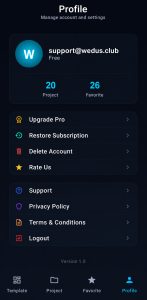
Open Esport Logo Maker Offline and navigate to the Profile tab.
Step 2
Ensure you are signed in with your Google account.
Step 3
On the Profile screen, tap Delete Account.
Step 4
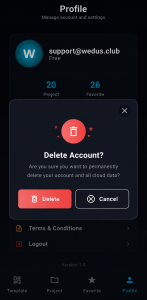
A confirmation dialog will appear informing you that your account and cloud data will be permanently deleted.
Step 5
Tap Delete to confirm.
Step 6
Wait until the deletion process is completed successfully.
Your account and associated cloud data will then be permanently removed from our systems.
Data Retention
After account deletion:
- Cloud-stored user profile information is deleted.
- Cloud-synchronized projects are deleted.
- Cloud-stored favorites are deleted.
Certain technical records may be retained for a limited period where required for:
- Security purposes
- Fraud prevention
- Legal compliance
- Financial and subscription records required by applicable laws
These records are not used for advertising or account restoration.
Need Help?
If you experience issues deleting your account through the application, please contact:
WEDUS
Email: support@wedus.club
Please include the email address associated with your account when contacting support.